Appearance
Administrator overview
School AdminAs your institution's administrator you set SolAssists up, give people access, and keep the records right. This page is a map of the app from an administrator's point of view.
The screen
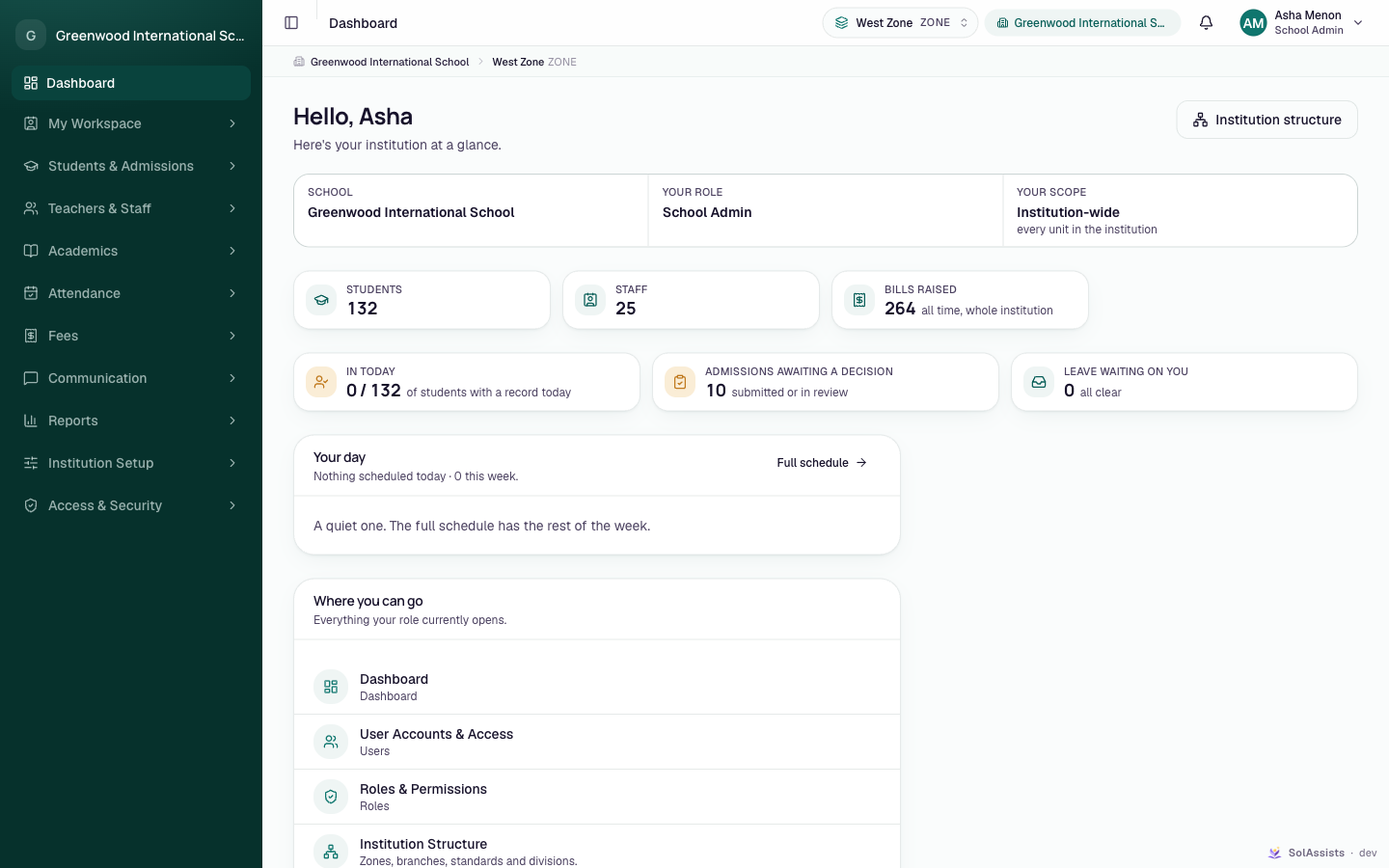
| Part | What it does |
|---|---|
| Sidebar | Every screen your role opens, in groups. Items for modules you don't have, or permissions you don't hold, are hidden — not greyed out. |
| Working-scope picker (top bar, shows a unit name and its level) | Chooses which part of the institution you're working in. Lists and pickers show "this unit and everything under it". It is a filter, not extra access. Only shown when you have more than one unit to choose from. |
| Scope bar (under the top bar) | The path to the unit you're working in, e.g. Demo Public School › Main Campus › Grade 8. Click a step to jump to a sibling. |
| Institution switcher (top bar, wide screens) | Only if your account belongs to more than one institution. Switching reloads your role, permissions and modules there. |
| Bell | Your notifications. |
| Account menu | My profile, switching context, and signing out. |
The dashboard
The Dashboard shows "Hello, name" and "Here's your institution at a glance.", then:
- your institution, Your role and Your scope;
- counts: Students, Staff, Bills raised (only for modules you have);
- things waiting: In today (attendance so far), Admissions awaiting a decision, Leave waiting on you;
- Your day — your own lectures today;
- Where you can go — every screen your role opens.
The sidebar, group by group
| Group | Items | Guide |
|---|---|---|
| My Workspace | My Schedule, My Leave, My Profile, People Directory | Staff leave |
| Students & Admissions | Admissions, Students, Parents & Guardians, Bulk Student Import | Students, Parents |
| Teachers & Staff | Teachers, All Staff, Staff Shifts, Leave Approvals | Teachers, Staff records |
| Academics | Teaching Assignments, Class Timetable, Study Material, Examinations | Timetable, Examinations |
| Attendance | Mark Attendance, Attendance History, Devices, Attendance Policy | Attendance |
| Fees | Invoices & Payments, Concessions, Fee Setup | Fees |
| Communication | Announcements | Announcements |
| Reports | Attendance Reports, Subject Rankings, Toppers | Reports |
| Institution Setup | Setup Checklist, Institution Structure, Academic Sessions, Subjects, Bell Schedule, Student Groups, Rooms, Departments, Leave Types, Branding | Set up your institution |
| Access & Security | User Accounts & Access, Roles & Permissions, Audit Trail | Users and access, Audit trail |
Some labels follow your institution type — for example a coaching centre sees Batch where a school sees Division.
If you have more than one access
If your account has several roles or institutions, after signing in you see Where are you today? with one card per access (institution, role, and unit or "Institution-wide"). Pick one. You can switch later from the account menu.
What an administrator does, and how often
| When | What | Guide |
|---|---|---|
| Once | Structure, sessions, bell schedule, subjects, roles, branding | Set up your institution |
| Start of each session | New session, subjects, assignments, timetables, promotions | Academic year setup, Year-end promotion |
| As people join | Teachers, students, parents, staff access | Teacher onboarding, Student admission |
| Daily and weekly | Attendance follow-up, leave, admissions, fees, announcements | Operational manual |