Appearance
Reports
School Admin Teacher Parent StudentReports shows attendance across a date range, rankings per subject, and the top students. Students and parents follow results year by year on Progress.
Before you start
- SOL has switched on Reports for your institution. It is an add-on.
- An academic session is marked current. See Academic sessions.
- Attendance has been marked. See Attendance.
- Exams have papers with marks. See Examinations.
Where to find it
| Sidebar | Page / tab |
|---|---|
| Reports → Attendance Reports | Reports, Attendance tab |
| Reports → Subject Rankings | Reports, Subject ranks tab |
| Reports → Toppers | Reports, Toppers tab |
| My Institution → Progress (students and parents) | Progress |
The Reports page covers the unit chosen in the top-bar picker ("Results and attendance across <unit> and everything under it.").
Attendance report
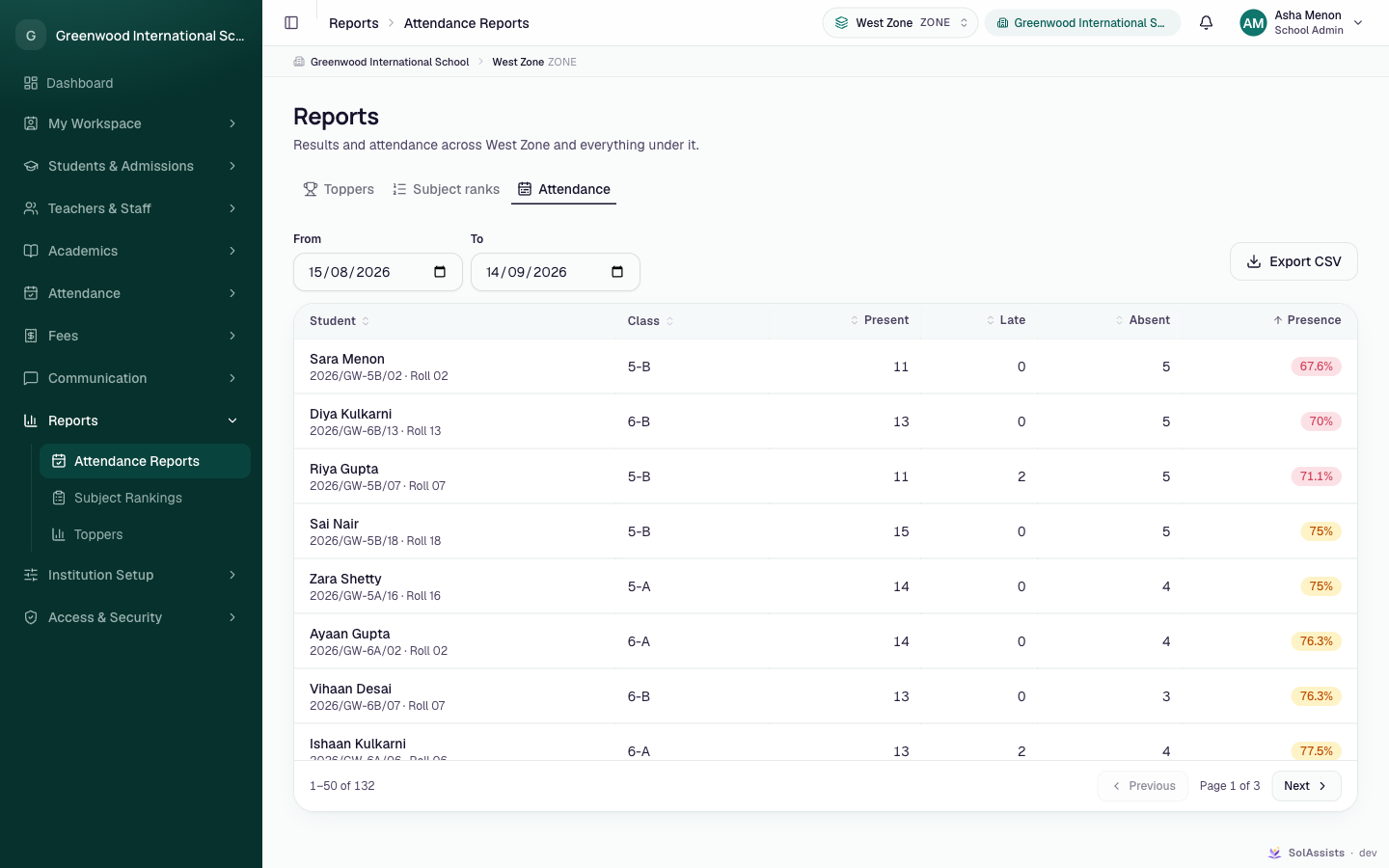
- Choose Reports → Attendance Reports.
- Pick the unit in the top bar.
- Set From (default 30 days ago) and To (default today). If several sessions exist, choose which session's class list to use.
- Read the table: Student, Class, Present, Late, Absent, Presence. Presence is green at 90% or more, amber at 75% or more, red below 75%.
- To download, click Export CSV. The button shows "Building…", then "Attendance report downloaded." If it fails ("Couldn't build that export. Try a shorter range."), shorten the date range.
Subject rankings
- Choose Reports → Subject Rankings.
- Choose an exam. The first exam that has marks is picked for you. Optionally choose a subject (default Every subject).
- Each paper shows a card with the rank, student, marks out of the maximum, and percentage.
Toppers
- Choose Reports → Toppers.
- Filters: session (This year, shown when there is more than one session), exam (Whole year, weighted, or one exam), and Top 10, Top 25 or Top 50.
- Columns: #, Student, Class, Exams counted, Result. Click a student to open their progress.
Students whose results are incomplete are left out. Tied students share a rank. The whole-year view weights each exam by the Weight set on the exam.
Progress (for students and parents)
My Institution → Progress shows a card per session with the weighted percentage. It shows each exam ("N of M papers marked · marks/max"), the grade, and per-subject marks. A parent with more than one child gets a picker. Families see published exams only.
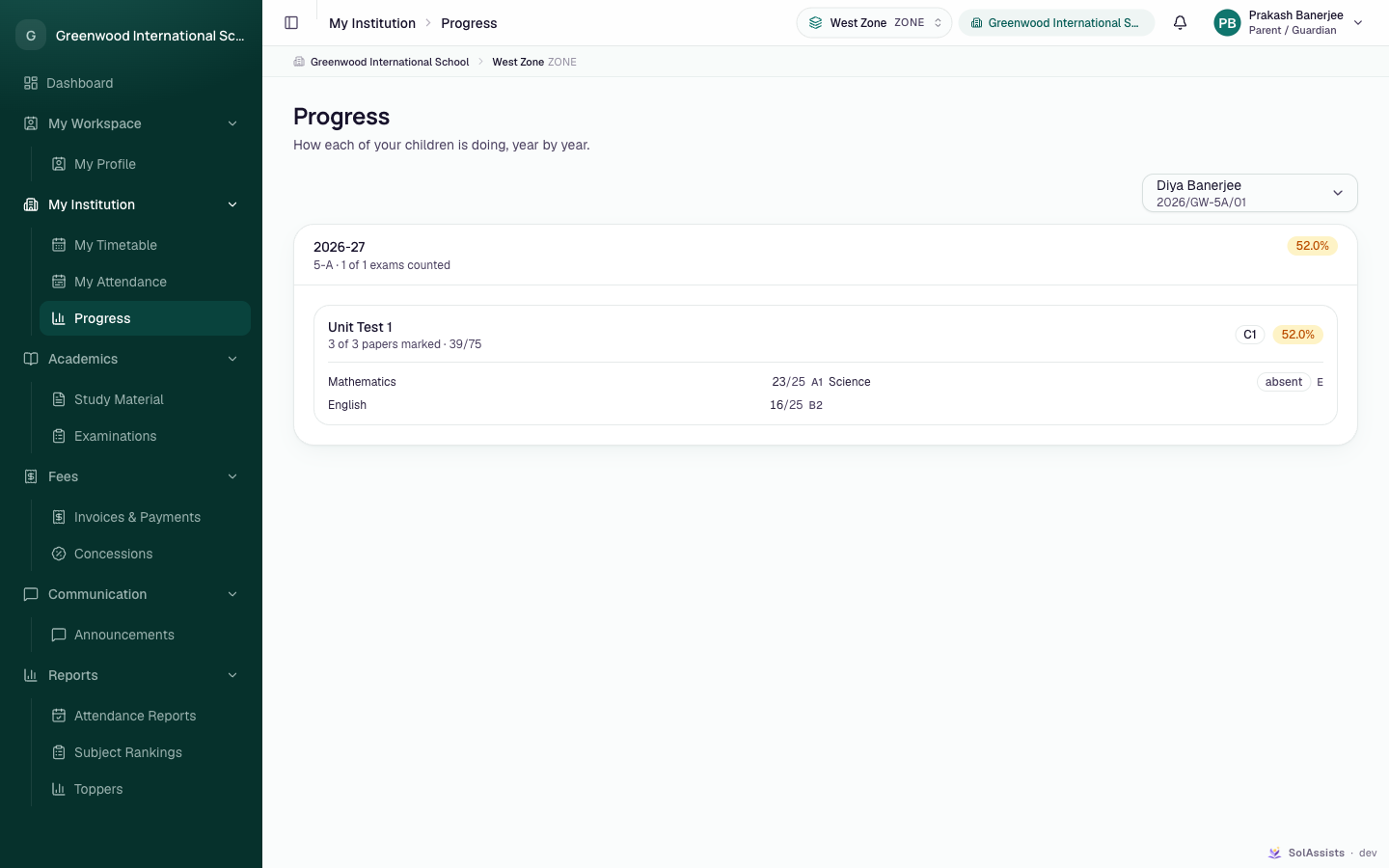
Progress appears in the sidebar only for people linked to at least one student. Grade letters appear only if grade bands exist for the session.
Filters
| Filter | Tab | Notes |
|---|---|---|
| Unit (top bar) | All | Covers the unit and everything under it |
| From / To | Attendance | "Ends before it starts." if reversed |
| Session | Attendance, Toppers | Shown only when there is more than one session |
| Exam | Subject ranks, Toppers | Toppers default: Whole year, weighted |
| Subject | Subject ranks | Default Every subject |
| Top 10 / 25 / 50 | Toppers |
Who can do this
| Task | School Admin | Teacher | Parent | Student |
|---|---|---|---|---|
| Attendance, Subject ranks, Toppers | Yes | Their own classes | Their own children | No Reports menu |
| Export CSV | Yes | Yes | No | No |
| Progress | Only if linked to a student | Only if linked to a student | Yes | Yes |
Common problems
| Symptom | Why | Fix |
|---|---|---|
| "Nothing recorded in that range" | No enrolments, or no register marked on those days | Mark attendance, or widen the range |
| "No exams to rank" | No exams exist | See Examinations |
| "Nothing marked yet" | The exam has no marks in this unit | Enter marks, or change the top-bar unit |
| "Nothing to rank yet" | No complete results | Finish marking every paper |
| "This institution has no current academic session yet." | No current session | See Academic sessions |
| Export CSV missing | No export permission | Ask your administrator |
| Progress missing from a parent's sidebar | The account isn't linked to a child | See Linking children |